

Single sign-on with no SSO tax
Access Manager provides full support for OpenID Connect, WS-Federation, and smart card authentication. Even in the free Community edition.


Access Manager lets you delegate sensitive admin access to your organization's computers in a modern and user-friendly way. It helps you deploy best-practice security solutions like LAPS and just-in-time access, without the friction that usually comes with them.
Replacing permanent admin access to your workstations and servers can help reduce the likelihood and impact of a widespread compromise. Access Manager is the solution that makes that a reality.
Professional edition from USD 750 a year, including 100 devicesOrder online for up to 1,000 devicesFree Community edition for up to 100 devices
Access Manager comprises two parts: the Access Manager Service and an optional Access Manager Agent. The service is a web app installed on a server in your environment that allows your users to securely request admin access to your devices. The agent is installed on your Windows, macOS and Linux fleet to provide additional capability like LAPS password management, and our RapidLAPS passwordless login capability.
A web app that runs on a Windows server in your environment. It's the one place your team goes for admin access, and the place where you decide who gets it.
An optional agent for your Windows, macOS and Linux devices that adds capability above and beyond what Microsoft LAPS provides.
With RapidLAPS, your team gets all the security benefits of LAPS without the pain of reading and typing long, random passwords. Someone needing to log on to a user's computer as the local admin simply scans a QR code with their phone, and hits approve.
The Access Manager agent adds a RapidLAPS tile to the Windows logon screen, and it works alongside the LAPS you run today. The password is still there behind the scenes and still rotates on your schedule, but your team never has to type it. RapidLAPS works at the Run as administrator prompt too, where you can see which app and which person want admin rights before you approve them.
How RapidLAPS works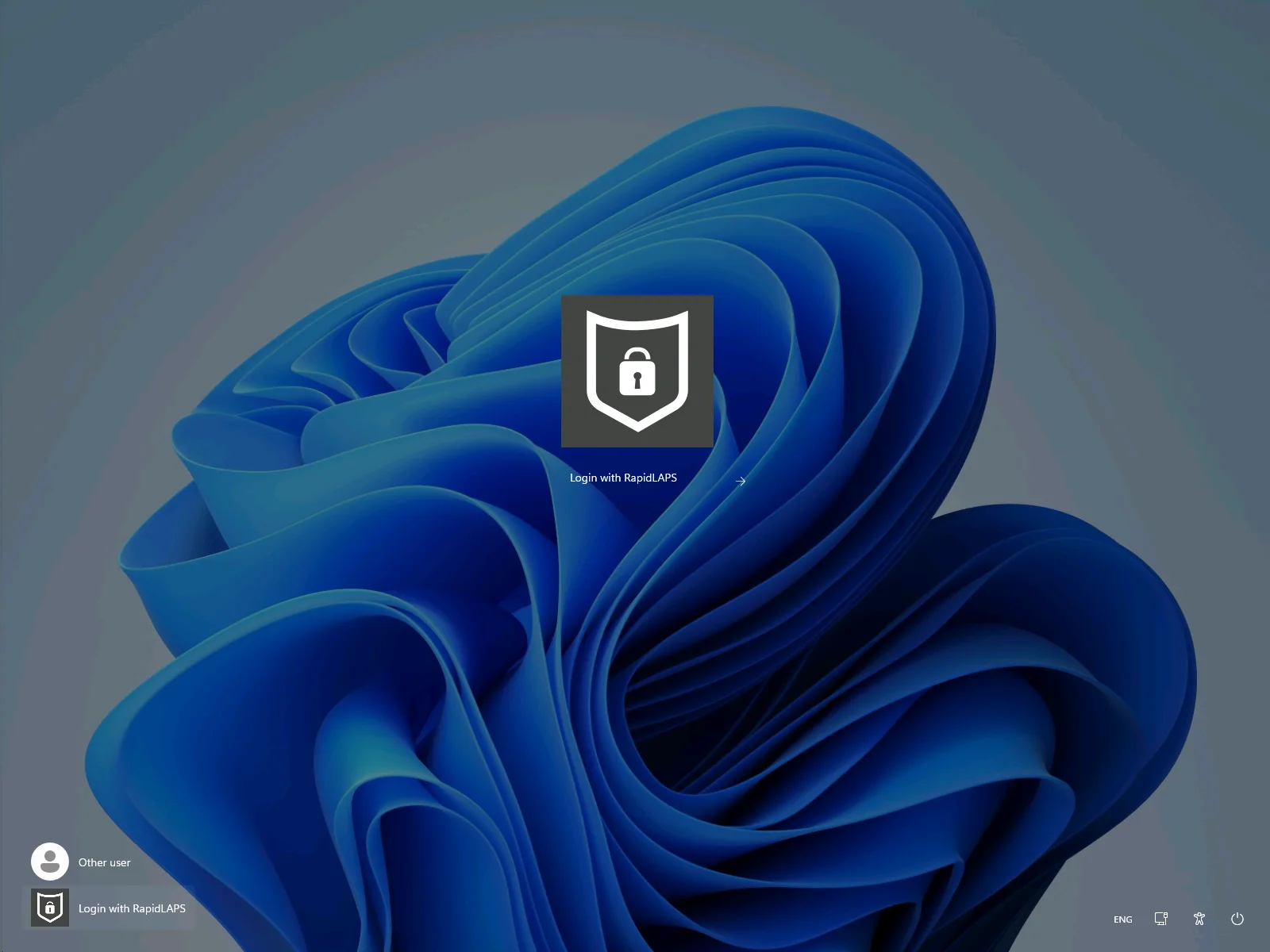
Choose "Login with RapidLAPS" on the Windows logon screen.
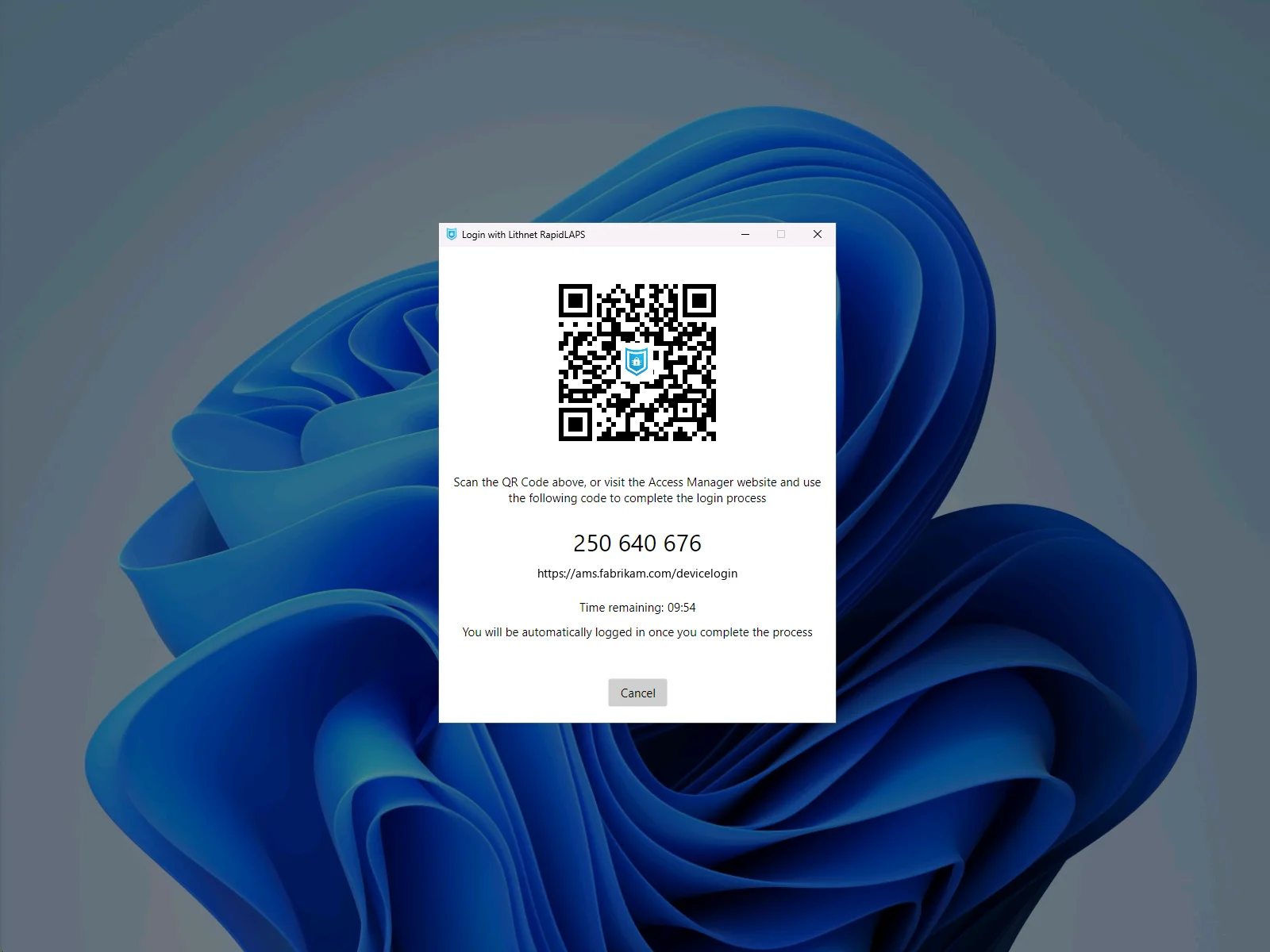
Scan the QR code with your phone's camera. There's no app to install, and if you don't have your phone with you, you can go to the address on the screen and enter the PIN instead.
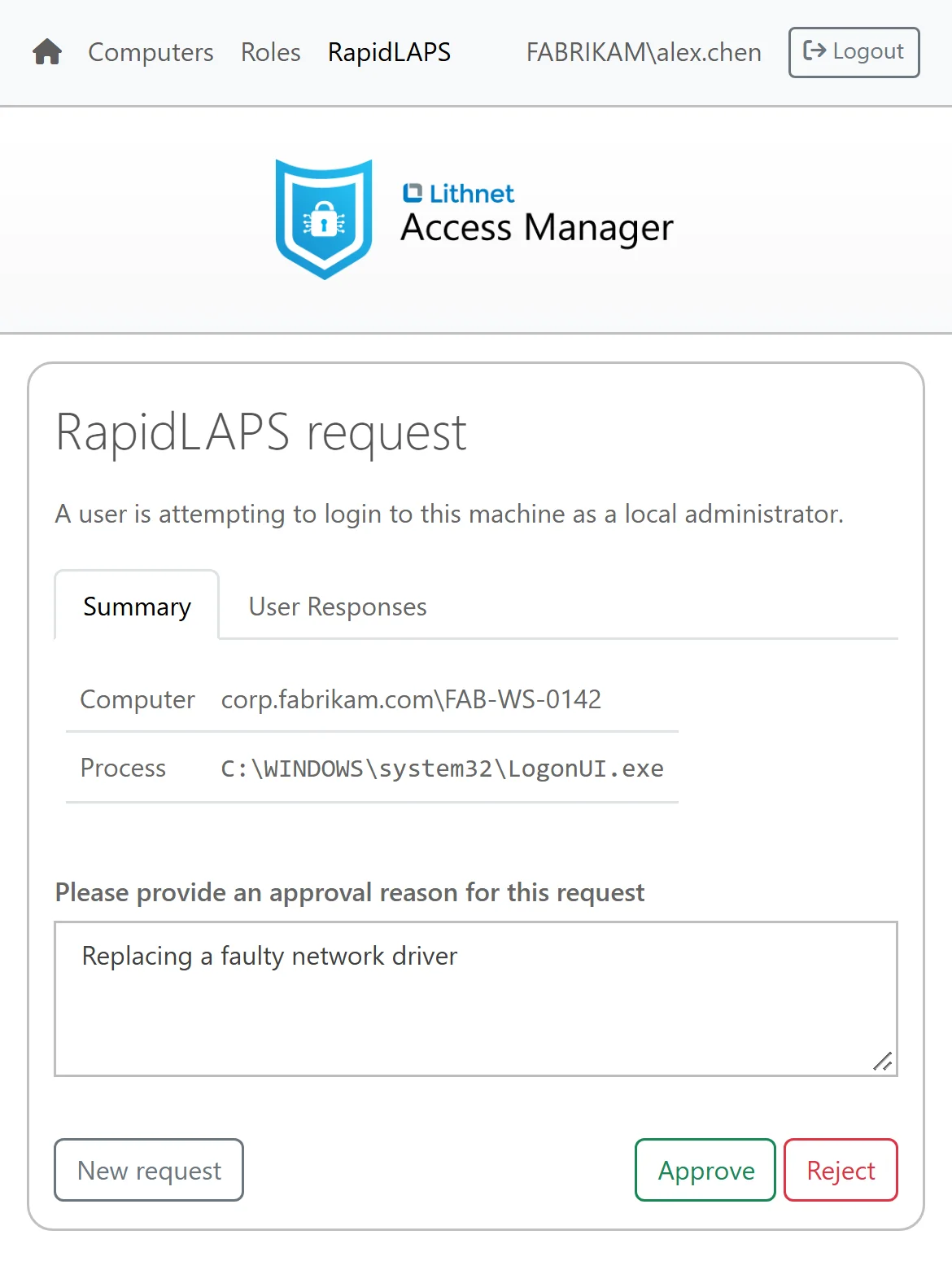
After signing in, review the request and click Approve. Access Manager checks that you're allowed to use that computer's admin account.
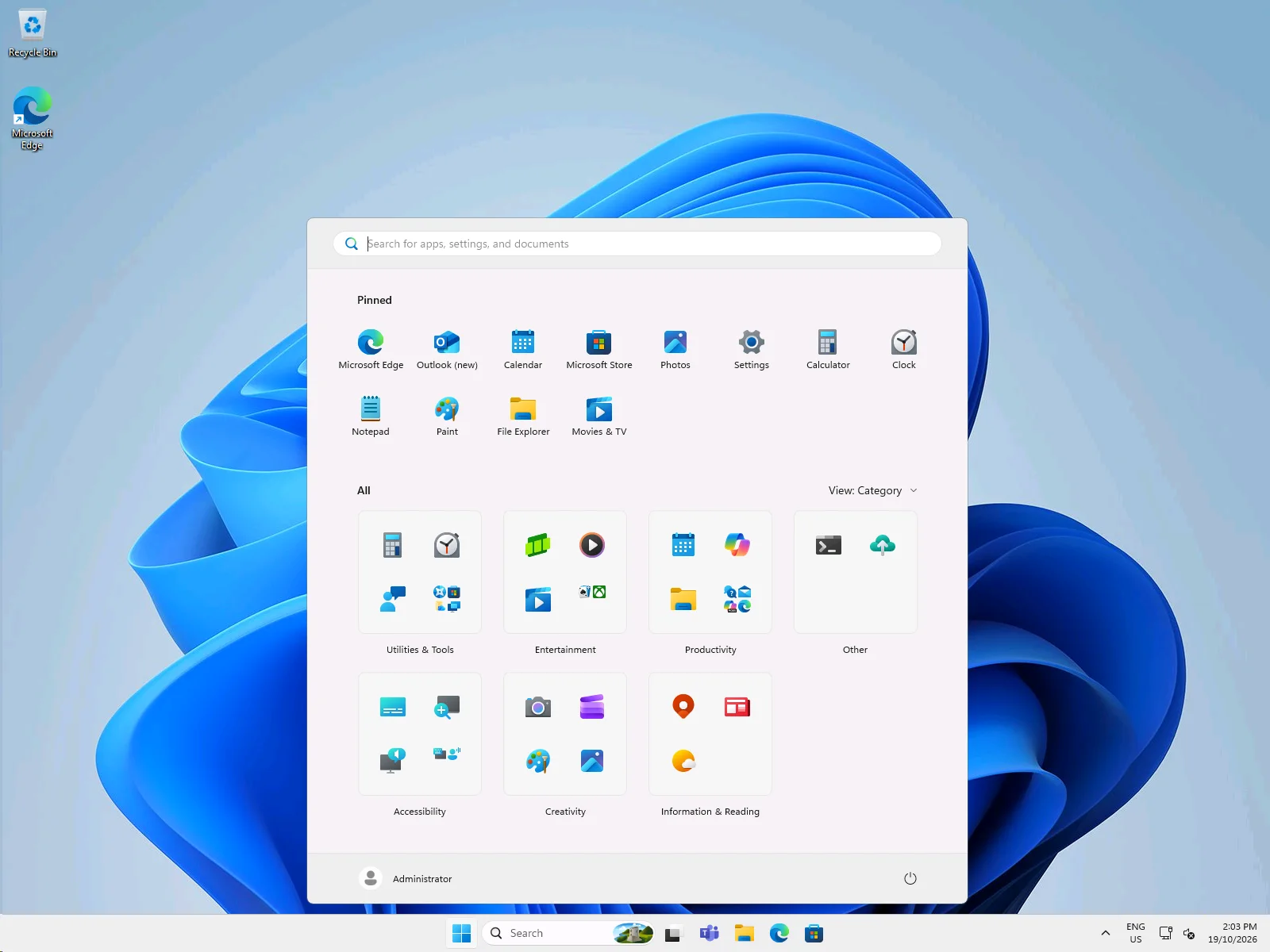
Access Manager then securely sends the LAPS password to the agent running on the machine, and Windows logs on to the local admin account without anyone seeing or typing the password.
It doesn't matter whether a password lives in Active Directory, in Microsoft Entra ID or in Access Manager itself. Your team types the computer's name, and Access Manager finds the password and shows it.
Access Manager can retrieve the password history that Windows LAPS and the Access Manager agent store. So when you restore a computer from a backup, you can look up the admin password that was in use on the day that backup was taken.
LAPS passwords and BitLocker recovery keys for your service deskWhen your admins need to use their own accounts, rather than LAPS to administer devices such as servers, Access Manager allows you to replace their permanent standing admin access, with just-in-time access. They request access in the same web app only when they need their privilege.
Access Manager then adds them to that computer's local administrator group, and removes them automatically when the time is up.
By transitioning away from permanent local admin rights, you ensure that at any given moment, relatively few accounts hold admin rights across your fleet. This makes it much harder for an attacker with one stolen account to spread from computer to computer.
Learn more about just-in-time access to computersJust-in-time access isn't restricted to just computers. Access Manager allows you to make a just-in-time role out of any Active Directory group. Create a role for application admin access or a group of servers, and your admins can request it when they need it. Access Manager adds them to the group upon request, and removes them again when their time is up.
Learn more about just-in-time access to rolesWhen a user is locked out of their computer, your service desk can find the recovery key in the same web app, behind the same sign-in and with the same audit trail as your LAPS passwords. The Access Manager agent ensures all recovery keys are securely backed up from all your Windows devices, no matter if they are joined to Active Directory, Entra, or not joined to any directory at all.
LAPS passwords and BitLocker recovery keys for your service deskLAPS passwords stored in Active Directory can be harvested with stolen credentials, and Active Directory has no way to protect them with MFA. Access Manager fixes that. Your team signs in to Access Manager through your identity provider, where you can apply your MFA and conditional access policies.
In the unlikely event that even those MFA-protected credentials are somehow stolen, Access Manager applies rate limits for each user and each IP address to stop the attacker from harvesting your passwords in bulk.
Protect your LAPS passwords with MFAAccess Manager provides full support for OpenID Connect, WS-Federation, and smart card authentication. Even in the free Community edition.
Access Manager records every request, whether it's granted or denied. Each audit event tells you who made it, which computer or role it was for and when it happened, along with the IP address it came from and the reason the person gave.
The Access Manager agent manages the local admin password on Windows, macOS and Linux, whether a device is joined to a domain, joined to Microsoft Entra ID or not joined to anything. Your team finds those passwords in the same web app as all the others.
We know how painful a long random password is when you have to read it off a screen, spell it out over the phone or type it at a logon prompt., so we've paid attention to the small details. The web app uses a font where you can tell a lowercase l from a capital I. It splits the password into short groups and spells it out in the phonetic alphabet, with the capitals marked so the person listening knows which letters to capitalize.
Access Manager can read passwords that Windows LAPS stores in Active Directory or Microsoft Entra ID, so you can get all the benefits of the web app without changing how your passwords are managed today. When you want more control, the Access Manager agent allows you to have a unified LAPS experience across your Windows, macOS and Linux devices.
We take security seriously, and Access Manager is designed from the ground up to keep your credentials safe. We use industry-standard AES-256 encryption, ensuring that secrets are protected in transit, and at rest.
The Community edition is free for up to 100 devices. It has no time limit and doesn't need a credit card. It includes RapidLAPS, passphrases, BitLocker recovery keys, the Windows, macOS and Linux agents, every sign-in method, rate limits and auditing, along with just-in-time access to computers and up to three roles.
Professional starts at USD 750 a year, including 100 devices. It unlocks the full capability of Access Manager and includes support directly from Lithnet. It is available to order online for up to 1,000 devices.
Enterprise edition is for large organizations with more than 1,000 devices. It has the same features as Professional, with volume pricing, payment by purchase order, and the ability to purchase through third-party resellers. Please contact us and we can provide you a tailored quote.
The Community edition is free for up to 100 devices. It has no time limit and doesn't need a credit card. It includes RapidLAPS, every sign-in method and just-in-time admin access to computers. Professional unlocks the full capability of Access Manager for up to 1,000 devices, and Enterprise covers larger fleets.
The Access Manager service can provide user-friendly web-based access to your existing Windows LAPS passwords stored in AD or Microsoft Entra. The Access Manager agent provides additional features above and beyond what Microsoft LAPS provides, but it isn't required.
The Access Manager agent provides a range of features above and beyond what Microsoft LAPS provides, but it is not required if you only want to access Windows LAPS passwords from the Access Manager web app.
Deploy the Access Manager agent if you want to use RapidLAPS, back up BitLocker recovery keys from your devices, or use LAPS passphrases based on custom word lists.
You can also mix and match, and use the Access Manager agent on some devices, and Windows LAPS on others. The Access Manager service provides a seamless experience to users regardless of where the LAPS passwords are stored.
The Access Manager agent is an optional program for your Windows, macOS and Linux devices, and you configure it to do exactly what you need. It can manage the local admin password and store it securely in Access Manager, generate passphrases from your own word lists, back up BitLocker recovery keys from your Windows devices, and give your team RapidLAPS passwordless logon and elevation. You can run it on every device, or alongside Windows LAPS on some of them.
Start with the Access Manager agent. Deploy it to your Windows, macOS and Linux devices, and every one of them gets its own managed local admin password, with RapidLAPS and passphrases ready for your team from day one.
Access Manager runs on a Windows Server that you host in your own data center or with your cloud provider. It keeps its configuration in a SQL database. By default, this is SQL Server Express on the same server, but you can use a separate SQL Server, Azure SQL or Amazon RDS database instead.
The free Community edition covers up to 100 devices. If you manage more than 100 devices, you need a paid license. Professional covers up to 1,000 devices, and Enterprise covers more than 1,000. Both paid editions are priced by the number of computers that Access Manager manages. This includes every computer whose LAPS password, BitLocker recovery key or just-in-time access Access Manager handles.
PAM suites cover many kinds of privileged accounts, such as domain admin and service accounts, and often add password vaulting and session recording. Access Manager focuses on admin access to your computers. It covers local admin passwords through LAPS, RapidLAPS, BitLocker recovery keys and just-in-time admin rights.
Yes. We can send you a free 30-day trial license key that unlocks every feature of Access Manager. Please request a free trial, and we'll email the key to you. You apply the key to a Community installation, and everything you set up during the trial stays in place when you buy a license. If you need more time to evaluate Access Manager, please contact us.
Professional starts at USD 750 a year, including 100 devices and support from Lithnet.
The free trial unlocks every feature for 30 days on a free installation.